Showing posts with label Appsolutely Fabulous. Show all posts

Thursday, September 13, 2012

APP-solutely Fabulous: Pulse

image from FreeDigitalPhotos.net
 
As the new school year begins, the amount of papers, textbooks, assignments, and events to keep organized can be a more than a little overwhelming.  Between old fashioned spiral bound planners and digital to-do lists or calender alerts, it feels like we can never do enough to stay on top of our organizational needs.  So we definitely don't have time to keep track of updates from favorite websites, recently discovered blogs, or preferred digital news providers.  Luckily, there's a great app for that!

In fact there are several different apps that can track and pull together all your favorite online updates into one location.  However, after trying out a few different options, I've definitely found a favorite personalized news reading app.  Pulse, an app designed by two graduate students at Stanford's Institute of Design in 2010, is an easy to use news reading app that works on multiple devices.  Pulse allows you to create a highly visual but clean and organized compilation of updates from all your favorite websites, blogs, social networks, and other online news sources.              

As this screenshot of a Pulse homescreen shows, Pulse differs from a regular RSS feed reader especially in its appearance.  Pulse is highly visual and easy to manipulate using the touch screens of tablets or smartphones.  After downloading the app for free to your iPad, iPhone, or Android device, you simply open the app, read the initial instruction screen, and begin customizing your Pulse news feeds.  The small white cog wheel in the upper left corner of the home screen opens the following screen which allows you to add pages & sources and to manipulate the arrangement of source feeds between pages and within pages.

A screen shot of the set-up screen, accessed by clicking on the white cog wheel in the top left of the homescreen.
 
Pop-up screen where you can choose new source feeds.
If you click on the blue add bars, this screen will pop up.  Here you can browse through Pulse's preselected and featured news sources by category and pick feeds to add to your home screen.  You can also connect to your Google Reader if you use it track RSS feeds already and then add sources from there.  If you're still looking for sources, then you can also click on the magnifying glass icon in the top left corner of this screen to search by keywords or specific web addresses.
 
When you tap on a image or 'tile' representing a blog post or article, a separate screen within pulse should pop up to display the full content.  You can also sync your Pulse across multiple devices; directions about that process are included on the Pulse F.A.Q. page, along with a range of other helpful answers and instructions.

Enjoy and happy organizing!
       

Thursday, May 17, 2012

APP-solutely Fabulous: Flashcardlet

image credit: adamr on freedigitalphotos.com
It's getting to be that time of year again--the time when the study guide pile up, a rainbow of colored tags poke out of every text book, and index cards supplies start to run low.  We have entered the dreaded exam season.  So for this edition of APP-solutely Fabulous, we're featuring a neat app that might help you streamline your study habits.  For many students, the old fashioned flashcard remains a favorite study method, especially for subjects with long vocabulary lists or pages of facts and dates.  Available for iPad, iPhone, or iPod Touch, the nifty app Flashcardlet (listed as Flashcards in the App Store) allows you to use this classic memory tool while removing the piles of easily damaged index cards from the process.   With this app, you can flip through stacks of digital flashcards in a variety of subject areas.  You can grab sets of flashcards from the flashcard and study games website Quizlet and add them to your Flashcardlet library in minutes or you can use the app to create your own sets of flashcards.  You can also create a free account on Quizlet and create flashcards there to access online or through the app later.  This app also allows you to view images as part of the flashcards, an advantage especially for art history or vocabulary studying.


Once you've chosen a flashcard set to work with, Flashcardlet also permits you to customize the way you use the flashcards.  You can go through in the original order or have them randomly shuffled.  As you move through the digital deck, you can star cards that you need to review again and you can check off cards with terms or ideas you've mastered.  You can also share flashcard sets with friends via Dropbox or email.

The app has a free version with advertisements running along the bottom of the screeen; for $2.99, you can get a version without advertisments.  It is generally easy to learn and use; I suggest using the Tutorial deck included with the app to get a quick lesson in how to manipulate the flashcards and customize your studying experience.

For more study habits help, stop by the library or the TLC to grab one of the TLC's great handouts on test prep and test taking strategies!

Thursday, May 3, 2012

Zite: APPS-olutely Fabulous Returns!

image credit: adamr on freedigitalphotos.com
After a bit of a hiatus, we're bringing back our APPS-olutely Fabulous feature here at the NCS Library blog! The lists of available iPad/tablet and smartphone apps keep growing daily--at almost alarming rates!  It can be difficult to keep track of them and sometimes surfing through the Apple app store can be overwhelming.  So every two weeks, we'll highlight a different app that we've discovered to particularly interesting, useful, and (hopefully) fun!


This week, our featured app is Zite, the personalized news reader that goes above and beyond the call of duty!  While there are many great ways to keep track of your favorite websites, blogs, and new sources on your tablet or smartphone, Zite stands out.  Zite (whose name comes from the word, "zeigeist") does more that simply track your favorite RSS feed in shiny new format; it also gathers new content based on your interests and your use of the app.  In much the same way a tool like Pandora suggests new musical artists based on your stated preferences and your ratings of new songs, Zite's personalized article collecting improvesas you use it.  So Zite not only creates a personalized magazine for viewing on your tablet or phone; it also helps you discover new content daily.

An example Zite homepage!

You can download Zite for free and it is currently available for iPad, iPhone, HP TouchPad, and Android phones.  When you first begin using Zite, you can give the app access to some of your existing methods for tracking content online, including your Twitter, Google Reader, and Delicious accounts.  The app will use information from these sources in addition to content areas you select or add to customize your personalized magazine.   


If you have a favorite app that you think we should highlight, 
tell an NCS librarian or leave a comment here!


Wednesday, February 2, 2011

Dragon Dictation: "App"-solutely Fabulous!

Apps are changing the nature of how we interact with technology. In this blog series, we will highlight some great apps that are guaranteed to make your life a little easier. Consider downloading these apps onto your personal smart phone or tablet device, or come to see them in action in the MS/US library.


About Dragon Dictation

Dragon Dictation is a great app that allows you to quickly dictate notes onto your iPad. Simply press the record button and the app records your speech. Press the screen again and the app will convert that speech to text.  Edit the text for any changes, and then email it, copy it, or send it directly to Facebook or Twitter.

You are limited to about 30 seconds of recording time, and try to make sure you speak clearly, in a quiet environment for best results.

Tuesday, January 18, 2011

Office 2 HD: "App"-solutely Fabulous!

Apps are changing the nature of how we interact with technology. In this blog series, we will highlight some great apps that are guaranteed to make your life a little easier. Consider downloading these apps onto your personal smart phone or tablet device, or come to see them in action in the MS/US library.


About Office 2 HD

While there are a few Office-document writing apps available on the iPad, Office2 HD is one of the best. With Office 2 HD, you can create documents on the fly and then email them to your self, open & edit documents from email, or even synchronize your google docs or dropbox account to open, access, and edit documents on the fly.

If you want to use your iPads to open and edit Word documents, this app is a must-have!

Friday, January 14, 2011

Notes from the iPads at NCS Open House

On Wednesday, January 12 and Thursday, January 13, the NCS Library held an open house for faculty and staff on the use of iPads at NCS.  The purpose of this open house was to get iPads into the hands of our instructors to show off the potential of these devices.

Below is the brief outline presentation with screenshots of some of the apps that were covered, as well as a link to some of the resources and websites mentioned.

Thanks to everyone who was able to attend!  If you could not attend the session, please schedule a time with Chip Chase and we'd be glad to cover it again during your free time.

iPads at NCS Presentation


Resources and Websites

All of these resources are located on our "iPads at NCS" website.
  • I Education Apps Review - A great resource for learning more about education apps, reviewed by a community of educators from across the country.
  • iPads in Education Ning - This social network of educators focuses on using iPads and Ebooks in schools and colleges.

Monday, January 10, 2011

iA Writer: "App"-solutely Fabulous!

Apps are changing the nature of how we interact with technology. In this blog series, we will highlight some great apps that are guaranteed to make your life a little easier. Consider downloading these apps onto your personal smart phone or tablet device, or come to see them in action in the MS/US library.


About iA Writer

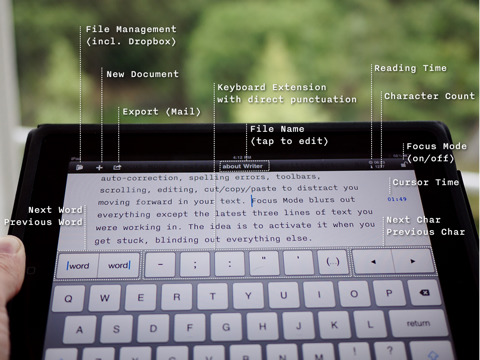
This app is special not because of all the bells and whistles it offers, but rather for the focus it provides through its simple design.

iA Writer is an app designed to be an ideal distraction-free writing tool. Instead of offering a variety of formatting options, iA Writer is a simple text editor.  Using this app is an ideal way to force yourself to get things done with minimal distractions.  It even offers instant character counts, and a "focus mode" to grey out surrounding text, forcing you to focus on the most recent three lines of text you are working on.

For more, watch this iPad App Review:

Tuesday, January 4, 2011

Penultimate: "App"-solutely Fabulous!

Apps are changing the nature of how we interact with technology. In this blog series, we will highlight some great apps that are guaranteed to make your life a little easier. Consider downloading these apps onto your personal smart phone or tablet device, or come to see them in action in the MS/US library.


About Penultimate

Penultimate is a great handwritten note-taking tool for the iPad.  Use your finger, or a special iPad stylus to take handwritten notes quickly and easily.  This app lets you create multiple notebooks, change pen color, and even email or export your notes to PDFs.

Currently, Penultimate is on a special holiday sale for only 99 cents!  Make sure to download it while you can.

Tuesday, December 14, 2010

Dropbox : "App"-solutely Fabulous!

Apps are changing the nature of how we interact with technology. In this blog series, we will highlight some great apps that are guaranteed to make your life a little easier. Consider downloading these apps onto your personal smart phone or tablet device, or come to see them in action in the MS/US library.


About Dropbox


Here in the library, we love Dropbox! And more and more, everyone with an iPad loves Dropbox too.

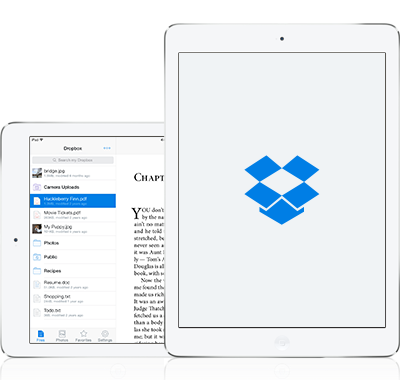
Dropbox is an ideal cloud-based solution for transfering files from one computer to another. Forget your USB drive, just create a Dropbox account and upload your files online.  Even better than other cloud-based file-syncing sites, install Dropbox on your computer in order to easily drag and drop to a folder in order to sync your files.

Every time you change a file in dropbox, your file syncs online.  So any computer that you have installed Dropbox will automatically refresh the file.

The Dropbox App


With the free Dropbox app, you can easily access all your files, and even more, you can use Dropbox to open your files in one of a variety of word-processing apps on the iPad.  This means that you can create a file on your computer, save it to Dropbox, and then continue working on it in Dropbox.

Dropbox is an app-solutely essential app!

Friday, December 3, 2010

Mobile Mouse : "App"-solutely Fabulous!

Apps are changing the nature of how we interact with technology. In this blog series, we will highlight some great apps that are guaranteed to make your life a little easier. Consider downloading these apps onto your personal smart phone or tablet device, or come to see them in action in the MS/US library.


Mobile Mouse

For our first App of the Month, we are highlighting Mobile Mouse.  This simple, but robust app can really change how you use your Smarboard in the classroom.

Mobile Mouse allows you to turn your smart phone or iPad into a virtual mouse for another computer.  This is ideal for when you want to interact with your computer on the Smartboard, without being stuck to the front of the room, or to your desk.

With this app there's no more "Sage on the Stage;" you're free to walk about the classroom, while still using your projector to display important information.


Remember, the Tech department does have wireless keyboards to be used with Smartboard as well. This is another option if you don't have a personal iPad or iPhone.
Related Posts Plugin for WordPress, Blogger...